Have you been jumping through countless articles and videos to find a simple guide that lets you publish your first blog without complications? Well, you’ve just landed on the right article.
This beginner-friendly guide covers every aspect of starting a blog, from choosing a niche to publishing your first post. We have simplified the process and made it easy for everyone to understand, from beginners to intermediates.
When you finish this article, you will have your own first blog published on the internet, and yes, you can call yourself a blogger then.
Let’s start from scratch and help you feel proud after you enter your published blog’s URL and read your own first blog.
Table of Contents
What is a blog?
A blog is a type of website (or a specific part of a website) where people share information, tips, solutions, experiences, and viewpoints in either a casual or professional tone.
A person launching a business can add a blog section to their website to connect with their audience. You can also create a website or use a platform dedicated solely to blogging to publish your blogs.
Since blogging is one of the strongest ways to stay in touch with your audience, its popularity has never faded away since its inception.
💡Fun Fact: There are over 600 million blogs on the internet
A blog can be about anything: lifestyle, healthcare, finance, IT, SEO, content writing, or just your daily routine. Yes, you can share anything valuable, entertaining, or engaging on your blog.
Why start a blog in 2026?
If you are reading this blog post, you are already interested in blogging.
But if you have even the slightest doubt in your mind regarding starting your blog, especially after reading terms like “blogging is dead” or “is blogging still worth it?”, let’s make it crystal clear.
The benefits of starting a blog I am about to mention will further solidify your decision and help you better understand the blogging landscape.
Start A Source Of Income
Even if you already have a job, you can turn blogging into an extra income stream. If done correctly, your blogging platform can help you earn more than your current profession.
Even by spending a few hours a week, you can build a professional blog that you can later turn into a passive income stream. And once you master the art of blogging, you can turn it into your main profession and become your own boss.
Become An Expert
This doesn’t mean you need to be an expert at any subject to start blogging. You can simply read about a field, gather knowledge, and write a blog about it. Slowly, you will build your own perspective and overview of the field and become an expert
Important Tip: Many popular bloggers weren’t experts in their field when they started blogging.
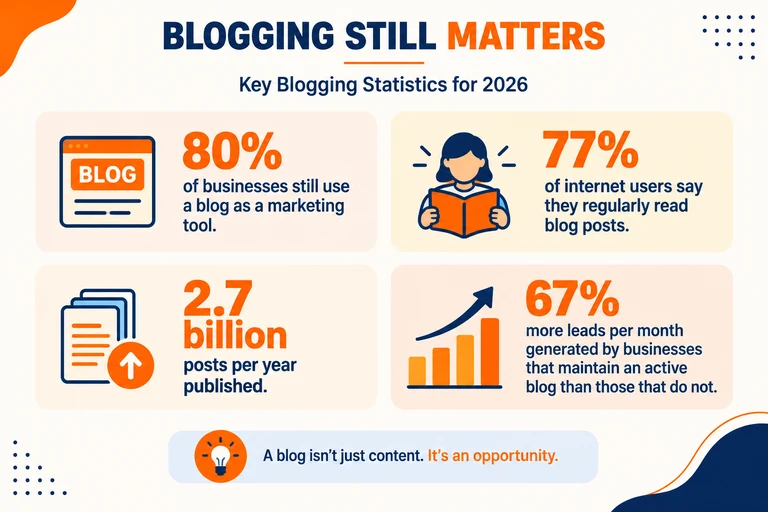
So don’t wait to become perfect in any field and then start blogging. Start now because market conditions are right, people are reading blogs, it still yields money, and it remains one of the strongest pillars of the internet.
Build An Audience Base
Blogging is one of the best ways to build a loyal, large audience. Whether you are a content writer or have a product or service, building an audience base is a necessity.
By writing high-quality, informative, and authoritative blogs on your platform, you will attract the right people- who are interested in what you say and think.
How to start a blog in 8 easy steps
1. Decide What You Want To Blog About
Before you think about anything else, decide what topic you will write about.
A blog niche is the topic you will write your blog on- like finance, travel, IT, or lifestyle. This is a crucial part of starting your blog because it will determine what audience you attract, what topics you cover, and what your blogging future will look like.
One thing you should avoid is writing about every topic on your blog.
For example, one day you write about finance, the next day about lifestyle, and then about IT. This way, neither your audience nor search engines will understand your expertise, and it will be difficult to rank your blog.
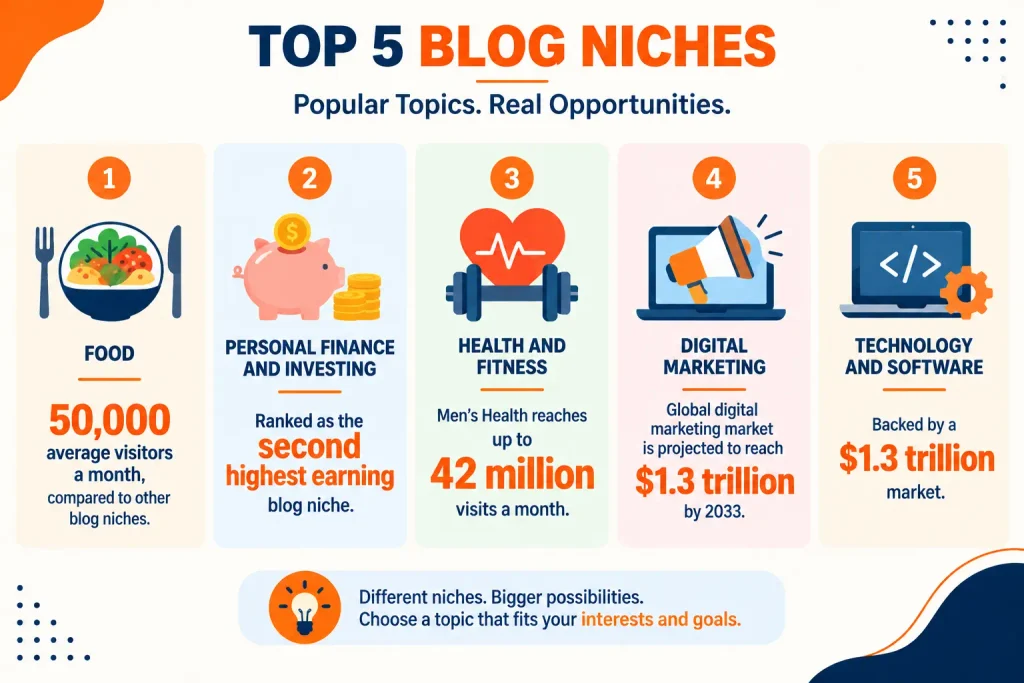
Here are a couple of points to consider while choosing a niche
- Don’t choose a niche just because you’re interested in it. You should be able to write thousands of blogs in that niche. Find a balance between interest and consistency.
- The niche you choose should have search-engine scope. For this, choose a couple of keywords in your niche and find their search volume. This will show you whether people are searching for the niche.
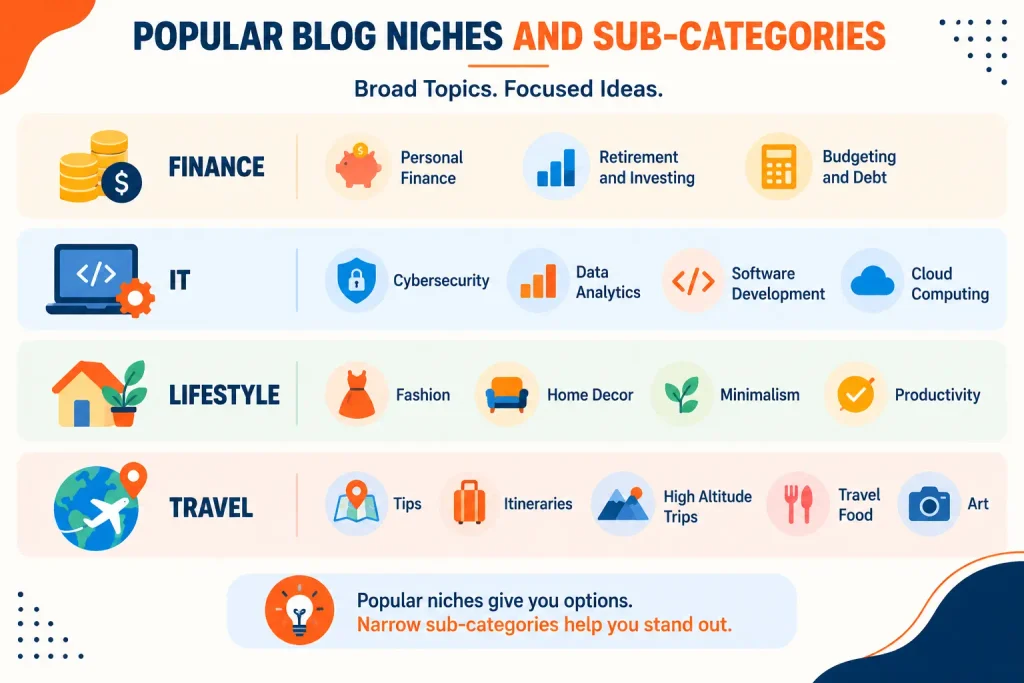
- Don’t choose a broad topic like “IT”. Narrow it down to something like “cloud accounting software” or IOT.
Some popular niches you can choose from
2. Define The Purpose Of Your Blog
Next, decide what you want to achieve with your blog. This might seem like a theoretical, bookish step that you don’t need to consider, but it is as important as any other step in starting a blog of your own.
We’re emphasizing this because it will help you choose the right platform and steer your blogging in the right direction. Here are a couple of reasons why people usually start a blog-
- Business
- Portfoliio
- Money
- Personal Brand
- Just For Fun
Be clear about what you want to achieve from your blog from the very beginning. If you want to build a portfolio that helps you gather clients for content writing, you will need to design and choose your blog setup strategy accordingly.
3. Choose The Right Blogging Platform
Now comes the vital part of starting your blog. Most articles on “how to start a blog” online describe a specific process, like Wix or WordPress. But if there are multiple options, you should know them all.
We have put the available blogging platform options in two categories: Log in and Go and Design and Publish.
In the first category, you create an account and start blogging, but in the second, you design your blogging platform, create pages, and then publish your blog.
Log in and Go
Medium
Medium is one of the biggest blogging platforms where more than 500,000 writers share their ideas, knowledge, and experience. You just have to create an account, write a blog, and hit publish.
When to choose it
- You are a hobby blogger
- If you are experimenting with blogging
- You are ok with not getting a customized platform
- You are ok with not getting complete control like design, font, and much more
Blogger
It is one of the first blogging platforms that is still used by thousands of bloggers. You can use your own blogging name, but it doesn’t have an audience of its own. You have to start from zero traffic. It is also an account> write > publish model like Medium.
When to choose it
- You want something very simple
- If you have zero budget
- If you wish to experiment with blogging
- You don’t need customization
- You are just doing blogging for fun
Design and Publish
WordPress.org
If you’re serious about blogging and want to build a strong portfolio, nothing beats WordPress.org.
WordPress.org is a CMS platform that gives you complete control over design and SEO. But don’t worry, you don’t need coding; using options like Elementor, you can use simple drag-and-drop features to build your website.
Interesting Fact: The website you are reading this blog on is built on WordPress.Org. And if you want to build a WordPress blog from scratch- from buying hosting and a domain to designing the website and publishing your first blog post- you can see our full guide on how to create a WordPress blog.
When to Choose It
- SEO-Focused Bloggers
- Professional Blogging
- Complete Control of Design
- Best for Monetization
WordPress.com
It might sound similar to the option above, but the .com version includes hosting, which means you won’t have to buy it. You also get a free web address (blogging.wordpress.com). Think of WordPress.org as owning and WordPress.com as renting.
When to choose it
- Want design but wish to start blogging quickly
- Avoid dealing with hosting
- If you want managed WordPress
- Best for beginners who don’t want to get into the technicalities of website building
Wix
Wix is another popular choice for beginners who want to build a website as simply as possible. It offers a simple drag-and-drop editor, so anyone with no technical knowledge can build a blogging website on Wix.
When to choose it-
- If you are a complete beginner
- Your priority is ease of use
- You want customization but don’t want to deal with the technicality of website building
- You want both hosting and website maintenance managed by someone else
- You want a customized website without coding
Other popular platforms include Squarespace and Substack.
If you chose Login and Go category, you can move directly to step 7 of this blog post; if you chose a platform from the Design and Publish category, you need to go through the steps sequentially.
4. Set Up Your Blog
To set up your blog, here are the three things you will need
- Domain Name– This will be the name that will be the URL of your blogging platform. For example: FinanceBlogger.com.
- Hosting- This is a rental service that stores all your blog files and information and delivers it to readers when they search for your blog or land on your blog page.
- Software– This is the CMS we talked about earlier, like WordPress, Wix, and Squarespace.
I’ll use Bluehost as an example, and I recommend it for new bloggers because it’s easy, simple, and productive.
- Create a Bluehost account, then buy a WordPress hosting plan. You can start with the starter plan.
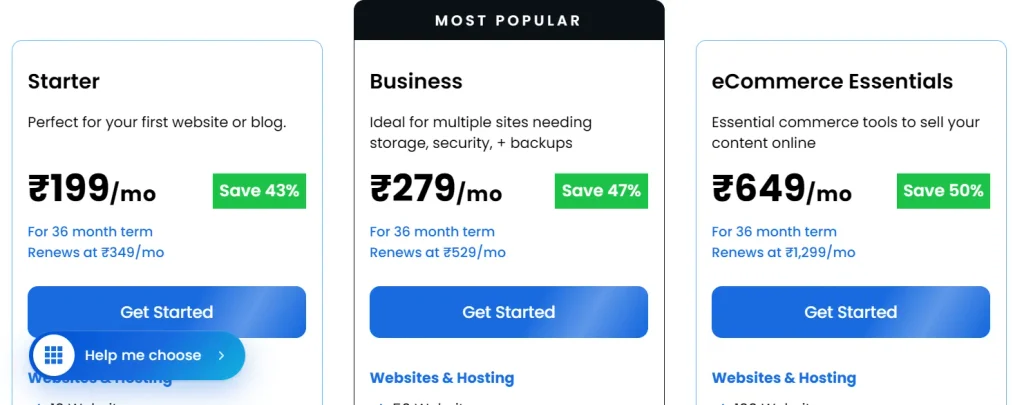
- If you buy the 12-month starter plan, you will get a domain name free for 1 year. Just make sure to register it during the process.
- Check everything and then check out. Make the payment, and then you can move to the setup process.
This video will help you with the entire process of purchasing a domain and hosting from Bluehost.
5. Design Your Blog
Now that you have bought the land and the base of your store, it’s time to design the store.
Website Layout
Here, you can customize your website to your preferences. In WordPress, start with the theme, which is the basic layout of your blog website. Then install Elementor, which gives you a drag-and-drop option to design your website.
You also have many other customization options: fonts, headers, footers, animations, colors, spacing, and more. Once you install Elementor, you can do all of these easily. I built this website using Elementor and WordPress with no prior knowledge of either.
This video will help you design a website using WordPress and Elementor from scratch.
But if you have chosen other platforms like Wix, Squarespace, or Substack, you can use a simple YouTube tutorial.
Logo
In the design stage, you will also have to design your logo. The logo on this website was designed in Canva in just 30 minutes.
The above tutorial will help you design a logo. Canva is easy to use, and you will need to learn it anyway for featured images, in-blog images, social media posts, and much more.
Color & Font
Although there are many things to customize on a blog website, I think I need to talk specifically about the color and font of your blogging platform.
Visit any website, and you will notice that on the entire website, on all the pages, there is a particular set of colors used in the design, not just random colors. A specific set of colors lets visitors associate that mix with your brand, improving brand recognition.
💡Interesting Fact: I have used shades of orange and black for this website.
The same goes for the font. While designing your website, don’t just choose random fonts. Stick to 2-3 fonts that don’t slow your site and work well on mobile screens, since you will be making your website mobile-friendly.
6. Build Necessary Pages
When you visit a website, you’ll likely see multiple pages besides the homepage. You need to create somewhat similar pages for your blog website. Some basic pages you might need to create for your blog website are-
- Homepage
- Blog
- About Us
- Privacy Policy
- Contact Us
To start a blog website, these pages are enough. Later, you can add more pages as your blog website expands and grows.
7. Draft and Publish Your First Blog
It’s time to publish your first blog and let the world know that you have entered the blogging realm.
You don’t need to be perfect while drafting your first blog. From learning how to start a blog in 2026 to publishing your first blog, you have already taken your first giant leap of the year. Just research, write, and publish like you used to do. Nothing fancy, nothing extraordinary.
But there are a couple of things you must consider while drafting and publishing your first blog-
- Make sure to include a featured image with your blog
- Find keywords and use them properly, not forcefully
- Try including bullet points
- Keep the paragraph length to 3-4 lines max
- Include images inside the blog
- Put external links
- Don’t worry about the length of your first blog
8. Promote Your Blog
This is a crucial aspect of starting your blog. Whether you started your blog for free on Medium or through a paid platform like WordPress, you can’t skip promoting it.
Create social media accounts for your blog. Google algorithms prioritize what people are talking about your blog and website on social media when it comes to ranking. You should create accounts on at least these social media sites-
- X
- Youtube
But don’t just use these social media handles for sharing the posts you publish on your platform. Create reels, shorts, and draft posts specially designed for X.
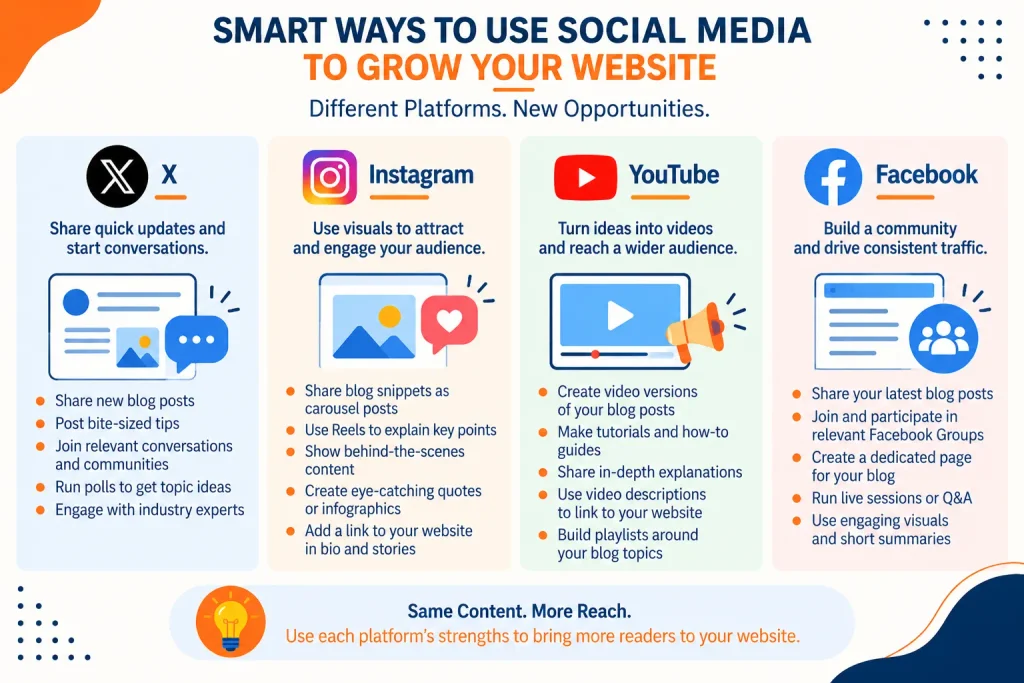
This way, you can create an audience, and when Google notices people talking about you and your blog on social media, it will be considered a strong factor for better ranking and traffic.
You are lucky to be active in an era when the digital world is expanding at the rate of our universe. And there’s no better time to start your blogging journey and harvest the benefits you have in mind.
Be clear about your goal, choose a platform, and stay consistent. This way, you can turn your blog into a brand and get more than you initially expected.
FAQs
How to start a blog for free?
If you want to start a blog for free, you can use Medium, Blogger, or LinkedIn. You can also use Wix to get a subdomain like BloggerBeta.wixsite.com, or WordPress.com to get a subdomain like BloggerAlpha.wordpress.com.
How much would it cost to start a blog?
It depends on the type of hosting you choose and how premium your domain is. On average, starting a blog with WordPress and Bluehost costs around $50. Yes, it’s that cheap.
Do I need coding knowledge to start a blog website?
No, almost all modern CMS platforms like WordPress and Wix offer drag-and-drop options. This lets you build your website by dragging and dropping designs and templates you like, without needing any coding.
Do I need a domain name to start a blog?
Not necessarily. On platforms like Medium and Blogger, you can start blogging without any setup. Then on platforms like WordPress.com and Wix.com, you can start blogging with a proper website and subdomains like NewBlogger.wordpress.com or Newblogger.wix.com.
But if you want your blog to look professional and give you full control with better SEO, you’ll need to buy a domain name to start a blog in 2026.
Can I earn money from blogging?
Yes, bloggers can earn money in many ways, including sponsored content, affiliate marketing, courses, memberships, advertising, and more. But you will need enough traffic, authority, and a loyal audience before you can monetize your blogging platform.