In the current digital era, starting a blog post is quite easy. You don’t need a big budget and coding knowledge to become a blogger. That might be the reason why there are 600 million blog posts on the internet. But over 96.55% of pages indexed on Google, including blog posts, never get any traffic from Google.
Many people think the main reason why my content never ranks is SEO. Although it’s true, it’s not in every case. If readers are interested in your blog post, stay to read it, and recommend it, Google will be more than happy to push it up in the rankings. And how to make readers interested in your blog post? By just providing information and SEO? Think again.
Inundating your blog post with information by spending hours on research is not enough, as it is widely available in various formats. It is the way you provide information to readers that keeps them reading, and this is where readability comes into play. But how to make your blog post easy to read, and why is it so important? Let’s find out.
Table of Contents
Why is readability important?
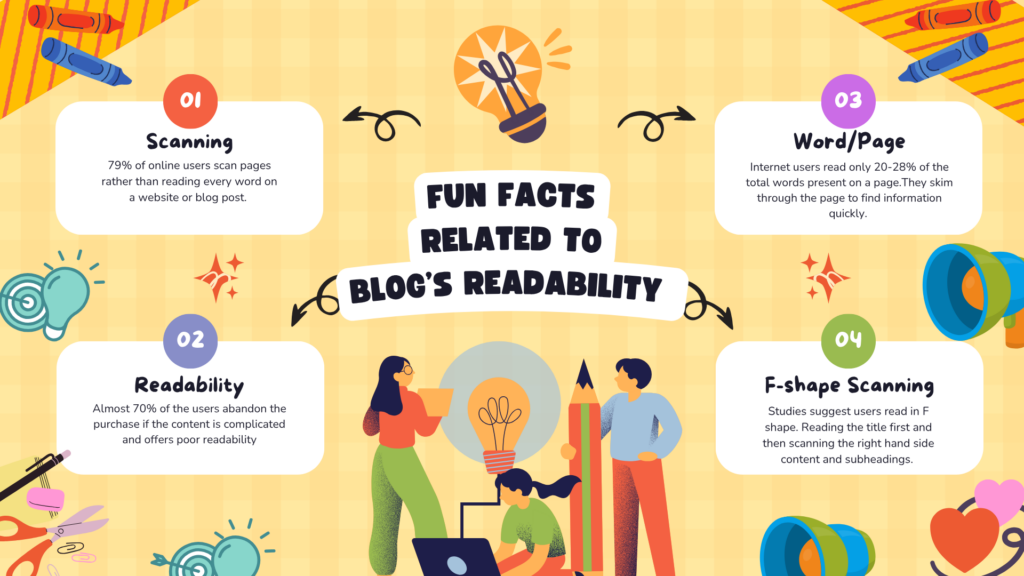
Around 73% of people skim blog posts rather than read them fully. This is why making your blog posts easy to read is important for increasing traffic. Doesn’t matter how valuable the information in the blog post is; if it’s hard to read, unpleasing to the eye, and requires extra effort to scan, readers will close the tab.
Go through a portion of an article below and tell me how you feel after reading it-
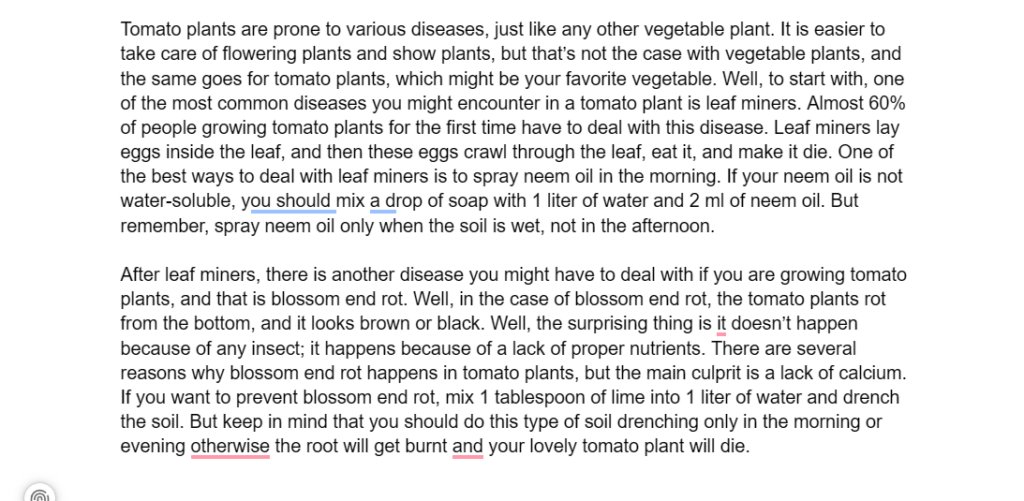
Did you feel like giving up in the middle? Were your eyes straining while going through the flood of words without headings, bullet points, or small paragraphs? Well, you must now understand why making your blog post easy to read is as necessary as making it search-engine-optimized and informative.
Which Parts of a Blog Should be Optimized for Better Readability?
1. Title
The first thing any reader will notice about your blog post is your title. That’s why you should begin optimizing your blog post for readability by focusing on the title first. There are two parts of the title you should work on to make it easy to read-
- Visual Aspect – This includes both the size of your blog’s title and the number of words. First of all, your blog title should always be bigger than the rest of your content. To keep it simple, always make the blog title 9 points larger than the content. Also, try to limit the character count to 60, as only 60 characters appear in the search result.
- Informative Aspect – Your title should be as simple as possible. The reader should get the gist of the content from the title alone, without having to read it twice. Make people believe that they have found the right blog post through your title.
2. Subheadings
A blog post without subheadings is like a library without sections; it looks all messed up. Without subheadings, your blog post will turn into a research paper that no one will want to read. Use of subheadings divides your blog post into sections, making it much easier to skim and read.
Use as many H2, H3, and H4 as possible. Also, don’t forget to set subheadings to H2, H3, or H4 when working in WordPress. An organized blog post, divided into sections with subheadings, makes your content look more inviting and appealing.
3. Paragraph Length
Do you remember the paragraph length in the sample I shared above? It was way too long.
Short paragraphs automatically improve the readability and are used by most expert marketers. Always try to limit your paragraph length to 3 sentences, and if not possible, you shouldn’t extend it beyond 4 sentences. Anything beyond that will be skipped by the reader.
Apart from improving the article’s readability, short paragraphs make reading more enjoyable. If paragraphs are getting too long, work on the middle of the paragraph and break them into two shorter ones.
4. Images
Finding images in the middle of the blog is like finding those chocolate chips in the middle of your ice cream; it keeps up the excitement and never makes the task monotonous. But this doesn’t mean you should include random images and let them take control of your blog post.
Use informative images that clarify the content or make it more entertaining. You can simply use the free version of Canva and learn how to make images for your blog post in 1 hour. Also, try to maintain this ratio- For every 300 words, there should be an image. This means if you are writing a 1000-word blog, there should be at least 3 images in it.
5. Grammar
Don’t turn your blog post into a “Spot 10 grammatical mistakes” playbook for the readers. Grammatical mistakes are the biggest turn-off for readers. It breaks the flow of reading and can also turn the meaning of what you are trying to say upside down.
But you don’t need to spend hours proofreading your blog post before publishing it. There are many grammatical tools, like Grammarly, that you can use to spot common grammatical mistakes. Grammatical mistakes also reduce the authority of the writer, and this is the last thing any writer will wish for.
6. Introduction
I used to have a friend who always rattled off about 100 different things before getting to the main point. Isn’t that annoying? Your blog post can come across as annoying if the introduction is too long and unclear.
The introduction should never exceed 200 words. After writing the introduction, always ask yourself these questions-
- Is it letting the readers know what the blog post is about?
- Is it worth the reader’s time?
- How will my readers benefit from it?
- Is it getting off-topic?
- Is it smoothly transitioning the readers to the main content?
7. Table of Contents
This is the simplest yet the most overlooked aspect of a blog post. The table of contents is the mini box that lists the blog post’s headings and subheadings. It is usually present after the introduction or at the beginning of the blog post.
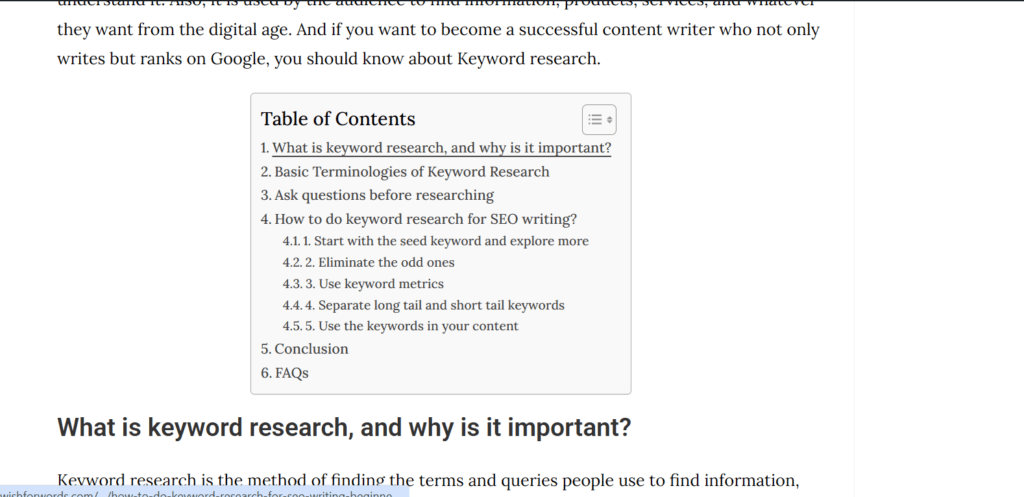
The table of Contents gives the reader an overview of the blog post without scrolling down. It also includes clickable subheadings that let readers jump directly to the most relevant section of the blog post. If you are using WordPress, you can easily include a Table of Contents with a free plugin.
8. Colored Hyperlinks
This is usually not covered when making a blog post easy to read. Adding hyperlinks to your blog post isn’t enough; please either use a different color for the anchor text or make it change color when someone hovers over it.
But what purpose does it serve? It breaks the monotony of the black words and gives the eyes a break. Please try this yourself: read an article with no color changes in the middle of the paragraph and one with hyperlinks that have a different color. You will find the second one more enjoyable to read.
9. Font size and type
Now, it’s time to look at the visual aspect of your blog post, and that is the way your words look. Both the font size and type of your blog can make or break your goal as a content writer. The font size and type should make reading the blog effortless.
If you are not able to decide on the font size and type, simply browse famous websites and blog pages and analyze their font choices. You can download WhatFont for Google Chrome, and it will show you the font size and type of whatever you open in Chrome.
10. Conclude
Never forget to conclude your article. You discuss different angles, perspectives, and opportunities in your blog post, which can make the reader’s thoughts wander. The only way to bring those thoughts together is through a solid conclusion.
The conclusion also completes the article, and even when a reader skims your blog post, the concluding heading makes it look professional and complete. Otherwise, it will look like the end of a Netflix episode, making people wait for the second part.
Conclusion
With so many websites and blog posts on the internet that provide information in seconds with a tap on the screen, the waiting time for internet users has decreased drastically. This is the reason why you need to be perfect in every aspect of your blog post. In such a fierce and competitive market, there is no way you can compromise on readability.
Just read your blog post once, not as a writer but from a reader’s perspective. This will give you an overview of how easy or difficult it is to read your blog post. Then use the 10 pointers in this blog post to make reading your blog effortless.
FAQs
Why do short paragraphs make blogs easy to read?
Short paragraphs of 3-4 sentences don’t make the blog look overwhelming. It looks visually appealing and adds a break to reading as well. Short paragraphs work well for both mobile and desktop.
What are some common blogging readability mistakes?
Common mistakes include using complicated words, long paragraphs, no bullet points or headings, long sentences, and no images.
What is the ideal sentence length for blogging?
15-20 sentences should be the ideal length for blog posts. Anything longer than that should usually be avoided. Short sentences give the brain breathing space, and therefore the reader enjoys the blog post rather than taking it as a challenge to read.