Blogging is a highly rewarding task, but only if you do it right. I have seen bloggers earn six figures from core blogging alone. And I have also seen thousands of bloggers quit because of common mistakes during my 9-year blogging career.
The Fourth Wall is a popular concept in blogging, with many bloggers quitting after just four months.
The reason- they don’t understand the very basics of blogging, and in some cases, they expect quick results. But the reality is that blogging takes at least 6 to 12 months to bear real fruit.
And once the tree starts bearing fruit, you wouldn’t be able to stop. Many bloggers start earning anywhere from $500 to $2000 after just one year of consistent blogging. And it multiplies manyfold once you master the art of blogging.
But before you enter the rewarding realm of blogging, I have compiled a list of blogging tips that every beginner blogger should go through, understand, and implement.
Table of Contents
1. Choose a Very Specific Niche
Writing on multiple niches like cars, politics, and taxes on the same blog won’t take you anywhere.
Google prioritizes Topical Authority (expertise in a specific segment), and when you write on everything, you become “a jack of all trades, master of none”. And Google prefers the “master of one“ when it comes to ranking.
So choose a very specific niche. And don’t choose it just because you are interested in it; choose a niche in which you can write thousands of blogs without losing interest. Examples-
- Cloud Accounting Software
- Tips and Guides for New Parents
- Kitchen Decor and Care
- SEO Writing
2. Set a Realistic Goal
Do you know what you want to achieve with blogging? Here are some common goals that bloggers have-
- Strengthen resume
- Earn money
- Share expertise
- Build an audience base
- Build a portfolio to show recruiters
Being clear about your goal is important because it will shape major decisions, such as which platform to choose, your expansion strategy, and more.
Also, the goal you set should be realistic. Setting an unachievable goal like “earn $250,00 from the very first month” will only lead to disappointment and the fourth wall of bloggers will take over.
3. Select the right platform
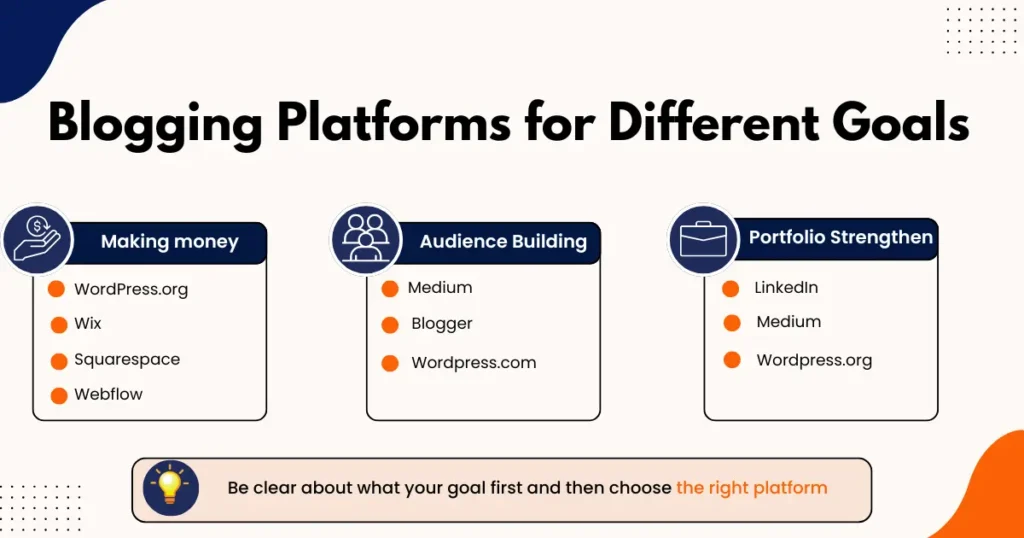
Clarifying the goal first is recommended because it will influence the blogging platform you choose.
If you just wish to build an audience, platforms like Medium and Blogger are perfectly fine. If you wish to strengthen your resume and build professional connections, then LinkedIn is the right choice.
But if you wish to grow professionally, turn blogging into a source of income, and build a customized, professional-looking platform, nothing beats WordPress.org.
4. Spend Time on the Introduction
Never rush while writing the intro of any blog post. The intro can make or break your blog’s performance, since it is the first thing a reader scans.
If the intro is deceptive, vague, and talks about many things around the main topic rather than the main topic itself, then nobody is going to read your blog post, regardless of how good the content is.
A perfect intro of a blog post should have –
- An explanation of what the content is about
- The promise of value that the reader will get from the blog
- Keyword in the first 100 words
- Word count not more than 200 words
- To the point explanation
- Discussion about the issue
- A paragraph that should motivate the readers while showing them facts
💡 Important– Include the primary keyword in the first 100 words of the introduction.
5. Start With Basic Keyword Research
Keyword Research might sound like a project in itself for beginners. But you should begin with basic keyword research, which will give you room to explore and improve without feeling overwhelmed.
Follow this simple keyword research process, CEEAT, which I have especially designed for beginners-
✅ Choose– Find your seed keyword first. If you are working for cloud accounting software, people will use the term “cloud accounting software” to search for the product, so it will be your seed or primary keyword.
✅ Explore – Put the seed keyword in the Google search bar and let Google show what other words appear after your seed keyword. Pick one to write a blog post on. The term must be related to your niche, and you should be able to write a blog post on it.
✅ Expand – Now, go to Ubersuggest> Keyword Explorer and enter your seed keyword to get secondary keywords and keyword intent. Make a list of keyword clusters where there should be a main keyword and then supporting keywords (related terms or synonyms)
✅ Analyze -You should also check the volume (preferably between 200-500), KD (Low) of your chosen keyword in Ubersuggest. If it doesn’t match the above parameters, choose another.
✅ Implement – Now, write a blog post on the keyword cluster you have chosen. Make sure to include the primary keyword throughout the blog post, but ensure it reads naturally.
6. Title Tags and Heading Tag (H1) can be different
First of all, yes, Title Tags and Heading Tags are two different things. Many writers, especially beginners, don’t know about it, and that’s why they miss a great SEO opportunity that can help them rank.
It is not always necessary to use different title and heading tags, but if the opportunity arises, never skip it.
Use the heading tag to introduce your blog post when a reader arrives on your page, and use the title tag for SEO and to increase click-through rate. Never try to keep the title and heading tag different. Look for the right opportunity and grab it.
7. The Title Tag Matters a Lot
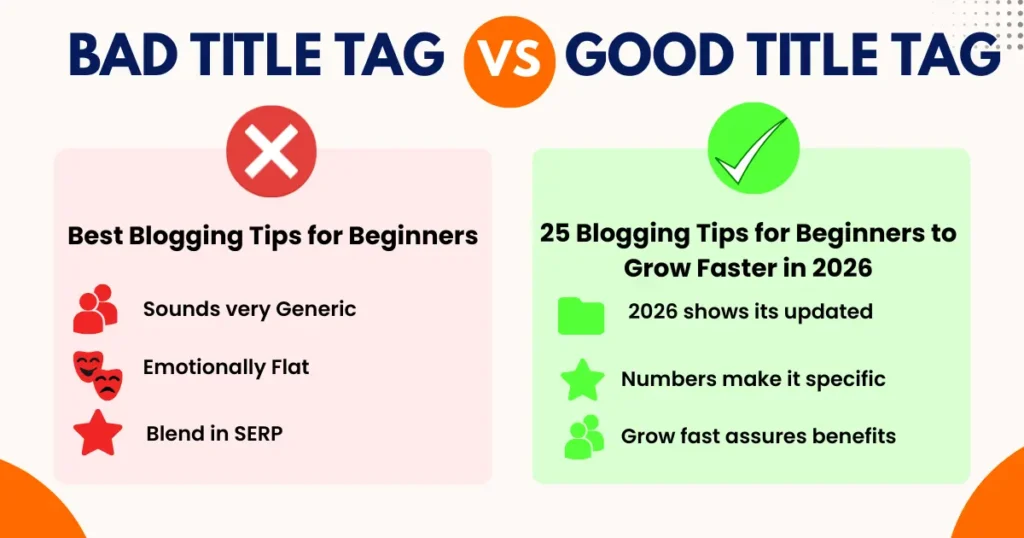
The Title Tag of a blog post is the first thing a user sees in the search result, and that’s why it can be considered the first point of contact between your blog and the reader.
The Title needs to be skillfully crafted. The first priority should be to keep it crystal clear. If the user has to read the title twice to understand it, then the title is of no use.
Unlike the heading tag (h1), which should be explanatory and descriptive, the title tag should be click-worthy.
Go through the query that a user might use to find your blog post, and then read your title tag from a user’s perspective. If the title tag makes you click it instantly, you have done your job well.
Here is an example of a good and a bad title tag
8. Craft a Strong Heading Tag
The main purpose of your heading tag is to clearly explain to the reader what the blog post is about. Just like the title tag, it should be clear, to-the-point, and not more than 60 characters.
Once the reader has arrived on your blog post, there is no need to focus on CTR through the heading. This is why your heading should be built around clarity and descriptiveness instead of CTR and SEO.
But the heading tag should also include your primary keyword, and it shouldn’t look like someone has forced it into the heading. It should sound natural.
9. Always include H1,H2,H3 tags
Go through both examples A and B below and tell me which one was easier to read-
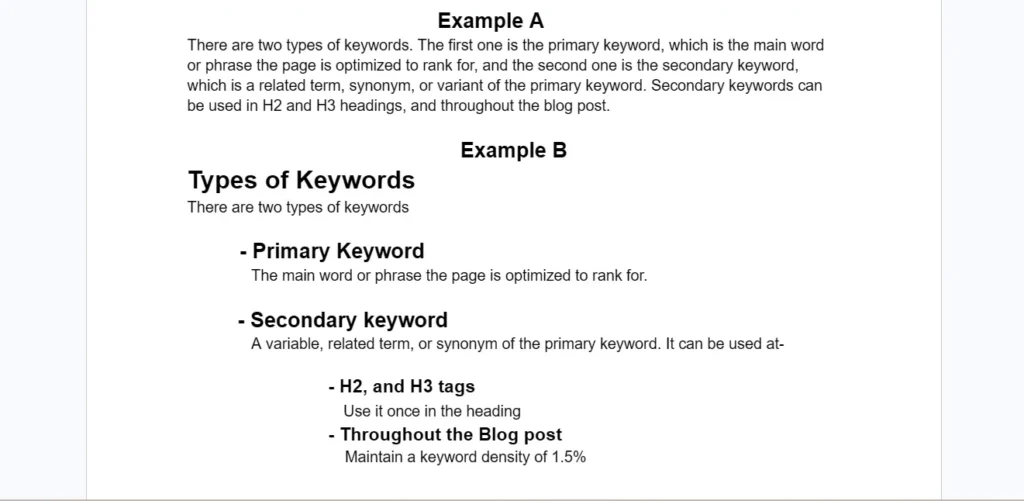
Although the content of both images is the same, example B was easier to scan and read, and it looked more structured. Why? Because the content body was properly structured with heading tags such as H1, H2, and H3.
Most readers skim through your blog post before reading it, and proper blog structuring with heading tags helps them skim more easily. This means the chances of the reader staying on your blog increase.
Also, better readability is appreciated by Google, making it easier for the algorithm to understand the topic, its context, and how the main topic is supported by subtopics.
10. Avoid Keyword Stuffing
Keyword stuffing is the practice of forcefully putting many keywords in content (which doesn’t look natural) to manipulate SEO.
There used to be a time back in the late 1990s and early 2000s, when keyword stuffing was “an ultimate SEO trick” but Google doesn’t promote it now and can even penalize your platform for it.
Just keep in mind, you can’t rank on Google just by putting a specific number of keywords in your blog post. Let the keywords come out naturally in your blog post while writing. And if you feel the number of keywords is low or high, adjust it.
💡Important– Use a 1 keyword/100-word formula while drafting a blog post if you are in doubt.
11. Don’t Use Primary Keywords Everywhere
Gone are the days when Google showed results based solely on primary keywords. Google has invested millions of dollars in providing the right results for users, not only content that contains multiple primary keywords.
But what to do if using primary keywords everywhere is an issue?
You have two options. You can use secondary keywords that are related terms or synonyms of the primary keyword. If not, you can also use the keyword intent.
If the primary keyword is “blog not ranking”, you can also rank if you write a blog on “Why Some Blog Posts Never Rank?”.
Google knows the intent behind the keyword, and if your content matches that intent, you can rank even without repeating the primary keyword everywhere.
12. Have White Spaces
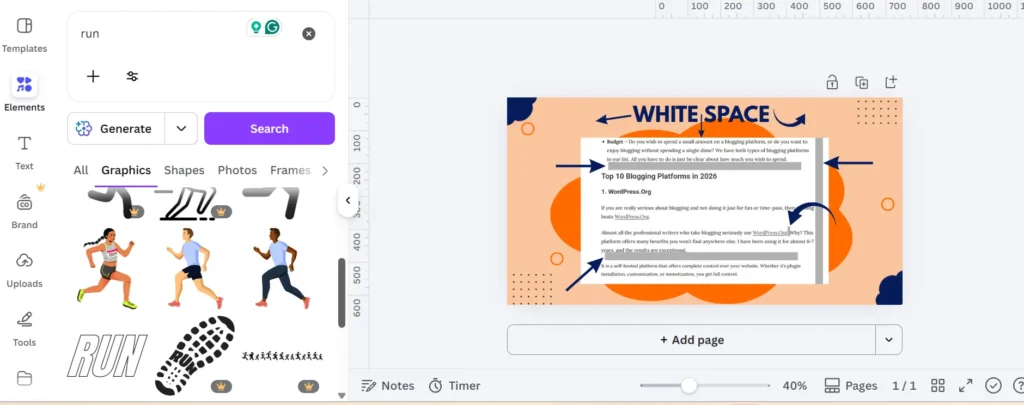
It is the empty area between your paragraphs, words, alignment, headings, and subheadings. By providing proper white space in your blog post, you make your content more scanable, readable, and visually pleasing to readers.
Here is an example of proper use of white space
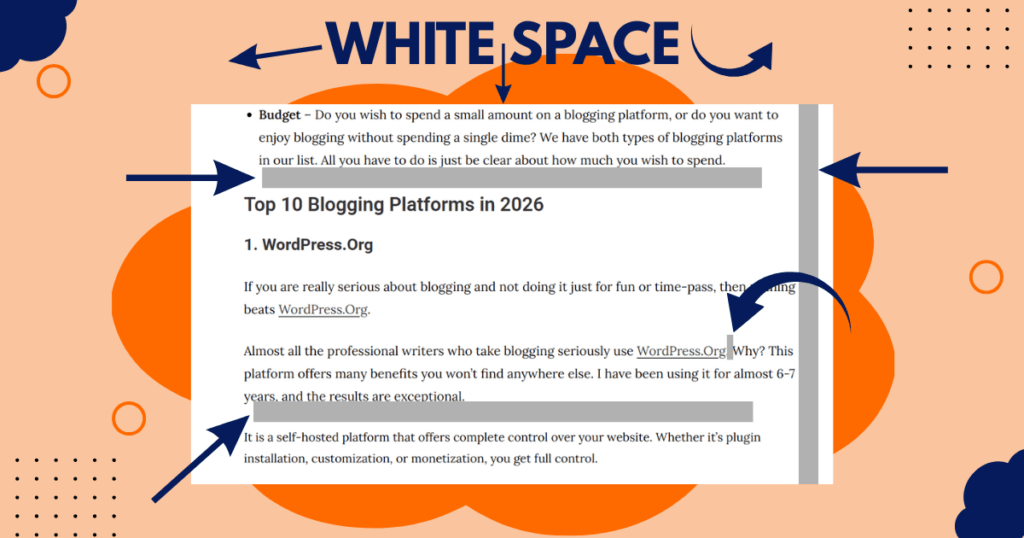
But never overdo it, try different white space parameters in your blog post, look at the preview, and then decide. There are no standard metrics for white space in a blog post.
13. Never Underestimate Bullet Points
Bullet points are among the most readily available yet underused weapons for bloggers.
Try writing a 6-line paragraph. Then write the same paragraph in two lines and break everything else into bullet points. What do you get?
You get an easily scannable, highly structured piece of content that will improve your blog post’s chances of ranking on the first page.
Go through both Example A and Example B below and tell me which one looks better.
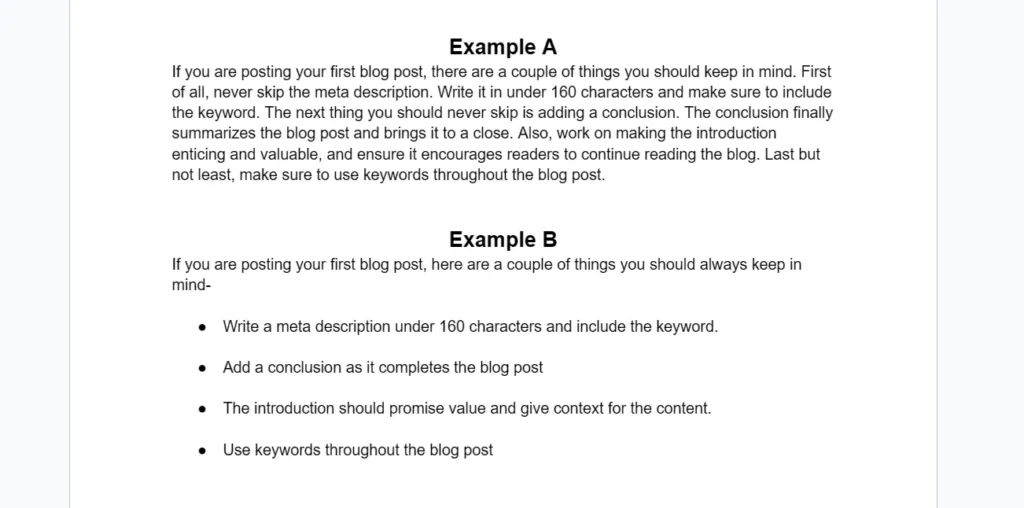
It’s obviously the example because it’s easily scannable, better structured, and breaks the complex part into an easily digestible format.
If there are multiple points you are explaining in a paragraph, and if there is a possibility of breaking them into bullet points, do it. Using bullet points offers the following benefits-
- Makes the blog easily scannable
- Google and AI reward blogs with bullet points
- Makes it easier for readers to process the content
- Breaks complex explanations into an easily understandable format
14. Learn Canva
If you are using images from Pexels and Unsplash for featured blog posts, it’s okay. But if you really wish to level up and turn your blog into a brand in the future, you should learn Canva.
Even the free version of Canva offers you unlimited creations, graphics, templates, and much more.
The benefit of using Canva is that you can create images in your brand’s theme, colors, and font. When this happens, users can identify your brand just by looking at the image you uploaded.
You can use Canva for creating featured blog post images, images used inside a blog, a logo, and much more. And it’s a simple drag-and-drop UI that’s easy to learn and master, even for beginners.
Even the finest content writers make mistakes, and some of those mistakes can go unnoticed.
15. Install Grammarly
This is why I would highly recommend that you start using Grammarly as a plugin in your Google Chrome.
It automatically suggests grammatical corrections in your blog post, which you can implement with just a click. You can use Grammarly without paying a single penny, as its basic autocorrection features are free.
Grammatical errors are the worst nightmares for content writers. But don’t blindly trust Grammarly suggestions; use your own skills and choose the corrections that make sense.
16. Focus on AI Overview
You must have seen that when you type something on Google, “AI Overview” appears first, even before any websites.
The text in the “AI Overview” is taken from websites that offer direct, clear, and proper explanations of the query. So your goal should be to appear in the “AI Overview”, but how?
- Write clear and direct answers
- Use bullet points for explanation wherever possible
- Keep paragraph length short
- Assign proper heading tags like H1, H2, H3, H4, and so on.
- Include variables before your keywords, like “Best, How, Why, When, Where” and try making questions for H2, H3, or H4
- Build Topical Authority by publishing blogs in the same niche and becoming an expert
17. Make the Most of Meta Descriptions
Meta Description is simply the two paragraph lines you see below the heading of web pages that appear in the search results.
It provides the reader with context on the topic, increases CTR, and makes the search intent clear to Google. But for now, let’s keep it simple and just do these two things to write a perfect meta description-
✅ Keep it under 160 characters and include your keyword in it.
✅ Don’t reveal anything important. Build curiosity and promise value through it.
18. Keep paragraph length small
This is the simplest yet most effective tip that every new blogger should follow.
Go through the blogs of Semrush, Hubspot, and Ahrefs. The one thing you will see across all these websites’ blogs is that they don’t write long paragraphs.
Always try to end your paragraph short (2-3 lines). Yes, there can be exceptions, but don’t let those exceptions become a habit and ruin the readability of your blog.
Short paragraphs make the blog easy to digest, and they don’t make the content look like a wall of words.
19. Build Social Presence
It might feel overwhelming to manage social media handles like X, Instagram, Pinterest, and Facebook while managing blogs, but you need to start.
Don’t lose your focus on blogging while managing these social media handles. Just create an account for your blog on all the platforms mentioned. Share the published blogs with them, and whenever you get time, post quotes from your blog or images on social media handles.
Although I could have avoided this point in this blog post and made your life easier, it’s necessary. You need to understand that Google analyzes what people are talking about your brand on social media, and a strong presence leads to better brand recognition.
20. Prefer Quality over Quantity
The most common question new bloggers have is “How many blogs should I publish?”
There is no specific answer to this question, and you should never focus on the number of blogs. If you need 4-5 days to draft a well-researched, properly structured, and informative blog, take your time and publish such blogs every 5 days without worrying about frequency.
It is always a good approach to publish 5 exceptional blog posts in a month rather than 30 ordinary ones. But you need to be consistent. You can’t just publish a blog today and disappear for 20 days.
21. Break Restless Reading
Restless Reading happens when a reader doesn’t get visual breaks while reading a blog post. And reading the blog post full of words and paragraphs only starts to feel like a reading marathon.
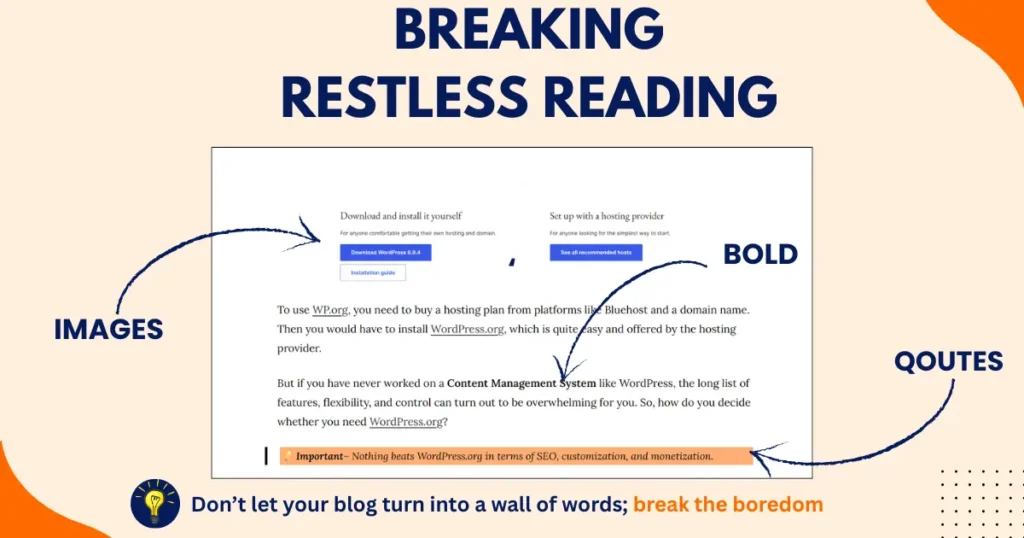
But there is a way to break the restless reading streak: images and quotes. Try including quotes with a colored background between paragraphs. Also, include images related to fun facts and data in the blog post.
Important- The quote shouldn’t be more than one to two lines.
You can also bold some sentences and use italics to give the eyes a visual break while reading your blog post.
22. Use Image Alt Text
Google is blind to the images uploaded with the blog post. You need text to explain the images to Google, and that text is called Alt text.
Never leave the Alt text empty while using an image in your blog post. Describe what the image is about in the Alt text, and if possible, try using the keyword as well. But where is the Alt Text option?
When you add an image, you get multiple editing options in the sidebar. Look for the Alt text option and write down a short and descriptive alt text for the image you have used.
23. Link your blog post
If you are using data from another website, link it; if you are using a quote from another platform, link it; every exact copy of content from another website should be hyperlinked to that website.
This isn’t just good practice; it also helps improve SEO. Hyperlinking provides Google with context about your website, making your relevance, hierarchy, and authority clearer.
24. Keep it simple
I have seen writers using flamboyant words, crafting sentences so elite that it becomes worthy of winning a literary award. You don’t need to go on that path.
Your real goal while writing a blog post shouldn’t be to draft the most literary-sounding blog that builds your authority as a master of English. It should just convey the information in the same format you had in mind when writing the blog.
Always try to keep things simple and clean. If a reader understands that the “meta description 160 character limitation” just by writing “meta description shouldn’t be more than 160 characters”, that’s it. There is no need to add anything extra or fancy to it.
25. Add FAQs and Conclusion
After reading a blog post, a reader’s thoughts run in multiple directions, especially when you write a long blog post covering different angles.
It is the writer’s job to bring all those racing thoughts back to the main topic and satisfy the reader with a brilliant conclusion. Summarize the blog in the conclusion, and keep the door to new possibilities on the topic open for readers.
Also, there are many questions under a topic that you might have missed answering in the blog. The reader can go back to Google or another website for those answers. Well, you can keep them on your blog by adding an FAQ section for more questions.
Final Thoughts
Mastering the art of blogging takes time, as there are multiple ends to cover. But everyone starts from scratch and keeps adding the right skillset required to write a high-ranking, readable, and structured blog. You need to do the same.
Just keep in mind that you are not going to grow overnight. Keep honing your skills, and the day you see your blog post ranking on the first page, you will look back and see the long list of areas you have covered to write that perfect blog.
FAQs
How long does it take for a blog to get traffic?
It can take a few months for your new blog to get traffic from Google. You will initially get impressions with zero clicks, and then clicks will kick in along with better impressions.
Should beginners focus on writing or SEO?
You can’t look at both of them separately because one complements the other. Keep improving your writing while adding new SEO skill sets to your profile to improve rankings, traffic, and engagement.
Can I start blogging without building a website?
Yes, you can start blogging on Medium, LinkedIn, and Blogger without building a website. On these platforms, you just need to write, edit, and publish without worrying about any technical aspects.
What’s the biggest reason beginner bloggers fail?
Not learning new things and not improving are the biggest reasons why beginner bloggers fail. The internet is an ever-evolving platform; you need to keep learning throughout your career to stay relevant and maintain rankings.
What are the best niches for beginner bloggers?
The best niches for beginner bloggers should be easy to write about and offer better SEO growth. Here are some niches that you can go with-
- Beginner investing
- Gardening
- Budgeting
- Saving money
- Diabetic Care